Using ONNX to Better Serve Your ML Models
In this blog post, I want to talk about a file format that I find incredibly useful in machine learning engineering: ONNX.
ONNX (Open Neural Network Exchange) is a file format designed to move ML models between different frameworks and runtimes. Its interoperability makes it a powerful addition to your toolbox, whether you're working with traditional ML or deep learning.
Even though ONNX is common in computer vision, it’s still relatively rare in classical ML. That's why, in this article, we'll train an XGBoost model and show that it is actually quite easy to use ONNX in that context.
I had a recent discussion with a former colleague of mine and he mentioned that pickle "just worked so why bother?". While I can understand the sentiment, I hope this article shows that ONNX brings real benefits beyond the pickle security issues mentioned in the previous blog post.
A Short Story From the Trenches
When I started out as a machine learning engineer a few years ago, I ran into a familiar problem: most traditional ML models need preprocessing: one-hot encoding, imputers, ordinal encoding, etc. Scikit-learn makes this easy with clean abstractions and the Pipeline API, which lets you chain preprocessing and models together.
But serving these pipelines in production at that time was a different story.
At first, we serialized the entire pipeline using pickle and exposed it using FastAPI. It worked, but performance wasn't great. We later switched to BentoML, which provided a nicer deployment workflow.
It helped a bit, but adding custom preprocessing hooks was painful, and performance wasn’t significantly better than our custom FastAPI setup. The bottleneck was still Python and the pickle-serialized pipeline.
A few years later, during a personal project where I wanted to serve an AutoEncoder for anomaly detection, I went back to BentoML. This time performance became a real issue, I could only push a few hundred predictions per second before the server saturated.
Enter ONNX
After revisiting a conversation with another former colleague of mine, I decided to try something I had previously ignored: ONNX.
ONNX lets you export an entire scikit-learn pipeline (preprocessing and model) into a format that can be executed by a high-performance runtime written in C++: the ONNX runtime.
Even better, runtimes or runtimes bindings exist in multiple languages. For that anomaly detection project, I wanted to use Rust, and thanks to Pyke's ORT, I could. The performance difference was immediately noticeable.
The key thing is that most of the workload is handled by the runtime, not by Python or Rust, and later in this post, we'll show that even when serving in Python, ONNX is faster than pickle. Something really cool too, there are initiatives like tract that offer a pure Rust implementation of the ONNX runtime and Pyke's ORT has recently add in its latest release candidate (rc10) the possibility to use it as a backend!
What This Blog Post Covers
In this post, we’ll:
- Train a simple pipeline on the adult income dataset using Scikit-learn and Optuna
- Export the pipeline to both pickle and ONNX
- Serve the model using:
- FastAPI + pickle
- FastAPI + ONNX
- Axum (Rust) + ONNX
- Benchmark all three using Locust
- Compare any training/serving skew
If you’ve ever had trouble deploying traditional ML models, or just want a faster, cleaner serving stack, ONNX might become your new favorite tool.
Training our model
As usual you will find the code here to follow along. The project is split into training, serving, and a folder for load testing with Locust.
The training script is pretty standard, but here’s the rundown:
- We focus on recall to capture as many high-income individuals as possible
- The Adult dataset is unbalanced, so XGBoost gets a class weight and we use a custom threshold
- Optuna runs 100 trials to tune hyperparameters
- Categorical features are split into ordinal and nominal
- A scikit-learn ColumnTransformer handles encodings
def create_preprocessing_pipeline(X: pl.DataFrame) -> ColumnTransformer:
    education_order = ["Preschool",..., "Doctorate"]
    ordinal_features = ["education"]

    all_categorical_cols = [col for col in X.columns if X[col].dtype == pl.Utf8]

    # Separate ordinal from nominal categorical features
    nominal_features = [
        col for col in all_categorical_cols if col not in ordinal_features
    ]
    numerical_cols = [col for col in X.columns if col not in all_categorical_cols]

    transformers = []

    # Add ordinal encoder for education with proper ordering and numeric categories
    if "education" in X.columns and X["education"].dtype == pl.Utf8:
        transformers.append(
            (
                "ordinal",
                OrdinalEncoder(
                    categories=[education_order],
                    handle_unknown="use_encoded_value",
                    unknown_value=-1,
                ),
                ["education"],
            )
        )

    if nominal_features:
        transformers.append(
            (
                "nominal",
                OneHotEncoder(handle_unknown="ignore", sparse_output=False),
                nominal_features,
            )
        )

    if numerical_cols:
        transformers.append(("num", "passthrough", numerical_cols))

    preprocessor = ColumnTransformer(transformers=transformers)
    return preprocessor
You need a few adjustments when exporting to ONNX:
def serialize_to_onnx(
    pipeline: Pipeline, X_sample: pl.DataFrame, model_path: str = "model.onnx"
):
    from onnxmltools.convert.xgboost.operator_converters.XGBoost import convert_xgboost
    from skl2onnx import update_registered_converter
    from skl2onnx.common.data_types import StringTensorType
    from skl2onnx.common.shape_calculator import (
        calculate_linear_classifier_output_shapes,
    )
    from xgboost import XGBClassifier

    # Register XGBoost converter
    update_registered_converter(
        XGBClassifier,
        "XGBoostXGBClassifier",
        calculate_linear_classifier_output_shapes,
        convert_xgboost,
        options={"nocl": [True, False], "zipmap": [True, False, "columns"]},
    )

    # Create initial types for each column based on their data type
    initial_types = []
    for col in X_sample.columns:
        if X_sample[col].dtype == pl.Utf8:
            initial_types.append((col, StringTensorType([None, 1])))
        else:
            initial_types.append((col, FloatTensorType([None, 1])))

    onnx_model = convert_sklearn(
        pipeline, initial_types=initial_types, target_opset={"": 12, "ai.onnx.ml": 2}
    )  # type: ignore

    output_path = Path(model_path)
    output_path.parent.mkdir(parents=True, exist_ok=True)

    with open(output_path, "wb") as f:
        f.write(onnx_model.SerializeToString())  # type: ignore

    print(f"Model serialized to ONNX format at: {output_path}")
    return str(output_path)
    onnx_model = convert_sklearn(
        pipeline,
        initial_types=initial_types,
        target_opset={"": 12, "ai.onnx.ml": 2},
        options={XGBClassifier: {"zipmap": False, "nocl": False}},
    )  # type: ignore
- The
target_opsetdefines the version of the ONNX standard and the ONNX-ML extension we are using, ensuring compatibility. "zipmap": Falsegives you a simple array output instead of a dict, it’s fasterinitial_typesdescribe the expected ONNX input shapes. UsingNoneallows variable batch sizes.- Categorical features must be declared as StringTensorType.
The sklearn-onnx docs explain this very well if you want to go deeper.
After training, we get this classification report, which is ok for the adult income dataset:
With optimal threshold (0.404):
F1 Score: 0.684
F-beta (β=2.0) Score: 0.807
              precision    recall  f1-score   support

           0       0.97      0.76      0.85     12261
           1       0.54      0.92      0.68      3857

    accuracy                           0.80     16118
   macro avg       0.76      0.84      0.77     16118
weighted avg       0.87      0.80      0.81     16118
The important part is that we now have two files:
models/adult_income_model.onnxmodels/adult_income_model.pkl.
Switching to ONNX wasn’t complicated, and most standard preprocessing steps convert cleanly.
Visualize your ONNX model
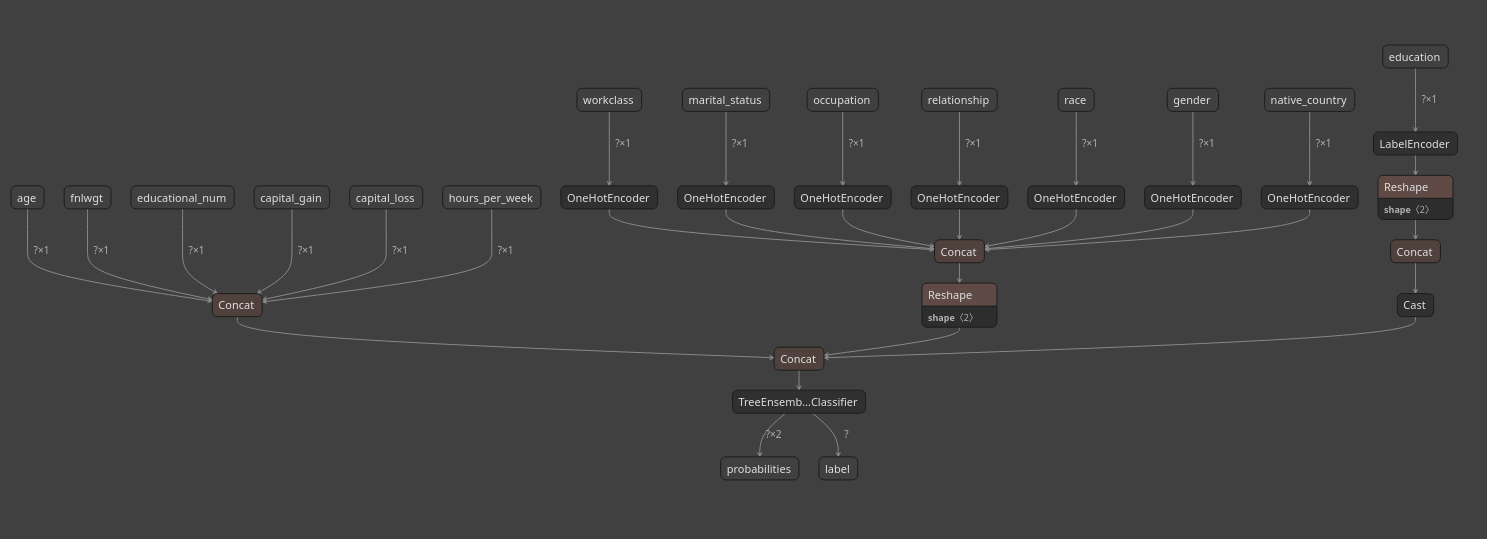
One of my favorite ONNX features is that ONNX models are graphs, which means you can inspect them visually.
Surprinsingly, I find this even more useful for traditional ML than for computer vision. CV models tend to produce huge, messy graphs where the visualization is usually too dense to be useful. Classical ML pipelines, on the other hand, stay compact and very readable.
I use Netron to visualize the model, available as both a Python package and a web app: https://netron.app/
A single command...
uv run netron models/adult_income_model.onnx
...opens the model graph in your browser!
Serving our models
To compare pickle and ONNX serving approaches, I've built three implementations:
- FastAPI + Pickle - Traditional sklearn pipeline served with Python
- FastAPI + ONNX - ONNX model served with ONNX Runtime in Python
- Axum + ONNX - Same ONNX model served with Rust
All three expose the same API (/predict and /predict/batch endpoints). You can find the complete implementations in the GitHub repository.
Model Loading: Pickle vs ONNX
Here's a key difference in how models are loaded and abstracted:
Pickle approach (requires DataFrame context):
The sklearn Pipeline with ColumnTransformer needs column names to know which transformation applies to which feature. This means you must provide a DataFrame at serving time:
# Model loading
class Model:
    def __init__(self, model_path: Path):
        self.pipeline: Pipeline | None = None
        self.pipeline = load(str(model_path))  # Loads sklearn Pipeline

    def predict(self, input_df):
        # Requires Polars/Pandas DataFrame with proper column names
        # ColumnTransformer uses column names to route features to the right transformers
        predictions = self.pipeline.predict(input_df)
        probabilities = self.pipeline.predict_proba(input_df)
        return predictions, probabilities
ONNX approach (direct tensor input):
# Model loading
class Model:
    def __init__(self, model_path: Path):
        self.session = ort.InferenceSession(str(model_path))
        # Can inspect expected inputs
        input_names = [inp.name for inp in self.session.get_inputs()]
        logger.info(f"Model expects: {input_names}")

    def predict(self, input_dict: dict):
        # Direct numpy array input - no DataFrame needed!
        return self.session.run(None, input_dict)
The ONNX version is explicit about its inputs and removes the need to maintain a DataFrame schema at serving time.
This means one less dependency (Polars/Pandas) in your serving environment.
Axum + ONNX
One of ONNX's biggest advantages is true language portability. Here's the same model served with Rust using the ort crate:
Session pooling for concurrency:
// src/model/model.rs
pub struct Model {
    sessions: Vec<Arc<Mutex<Session>>>,
    counter: AtomicUsize,
}

impl Model {
    pub fn new(model_path: &str, num_instances: usize) -> Result<Self, ort::Error> {
        let sessions = (0..num_instances)
            .map(|_| {
                Session::builder()?
                    .with_optimization_level(GraphOptimizationLevel::Level3)?
                    .commit_from_file(model_path)?
            })
            .collect::<Result<Vec<_>, _>>()?;

        Ok(Self {
            sessions: Arc::new(sessions),
            counter: AtomicUsize::new(0),
        })
    }

    pub fn predict(&self, inputs: &[Value]) -> Result<(Vec<i64>, Vec<f32>), ort::Error> {
        // Round-robin session selection for concurrent requests
        let index = self.counter.fetch_add(1, Ordering::SeqCst) % self.sessions.len();
        let session = self.sessions[index].lock().unwrap();
        let outputs = session.run(inputs)?;

        let (_, labels) = outputs[0].try_extract_tensor::<i64>()?;
        let (_, probs) = outputs[1].try_extract_tensor::<f32>()?;

        Ok((labels.to_vec(), probs.to_vec()))
    }
}

Input preparation in Rust:
// src/model/inputs.rs
pub fn prepare_inputs(data: &[AdultIncomeInput]) -> Result<Vec<Value>, String> {
    let batch_size = data.len();

    let make_float_array = |values: Vec<f32>| {
        Array::from_shape_vec((batch_size, 1), values)
            .and_then(|arr| Value::from_array(arr))
            .map_err(|e| format!("Failed to create value: {}", e))
            .map(|v| v.into())
    };

    Ok(vec![
        make_float_array(data.iter().map(|d| d.age).collect())?,
        // String tensors for categorical features
        Tensor::from_string_array(([batch_size, 1],
            &data.iter().map(|d| d.workclass.clone()).collect::<Vec<_>>()))?,
        // ... other features
    ])
}
The pattern is remarkably similar to Python! This is ONNX's power: write once, serve anywhere. The same .onnx file works in Python, Rust, C++, JavaScript, and more.
The Rust implementation includes session pooling (4 ONNX Runtime instances in this case) to handle concurrent requests efficiently, something that's more natural in Rust's concurrency model.
Benchmarking
I provide the same resources for every version of the service: 2 vCPUs and 2 GB of RAM.
I stress-test both endpoints, the single prediction and the batch prediction, to check for any differences in behavior.
Keep in mind that these results were obtained using a Ryzen 9800X3D, which is a powerful CPU, so your results may vary depending on your setup.
| Metric | FastAPI + Pickle | FastAPI + ONNX | Rust: Axum + ORT | Interpretation |
|---|---|---|---|---|
| Requests/Second (Throughput) | 535.25 req/s | 689.00 req/s | 1440.68 req/s | Rust/ORT handles ~3 times the load of FastAPI/Pickle and 2 times the load of FastAPI/ONNX. |
| Average Response Time (Latency) | 417 ms | 283 ms | 70 ms | Rust/ORT is dramatically faster, with an avg response time ~6x better than FastAPI/Pickle and ~4x better than FastAPI/ONNX. |
| Median Response Time (Latency) | 320 ms | 240 ms | 66 ms | Median times confirm the latency advantage for Rust/ORT. |
| Failure Rate | 0.31% (49 fails) | 0.03% (6 fails) | 0.00% (0 fails) | Rust/ORT showed perfect reliability (0 failures). FastAPI/Pickle showed the highest failure rate. |
| 99th Percentile Latency (P99) | 1600 ms (1.6s) | 820 ms | 230 ms | Rust/ORT maintains very low latency even for the slowest 1% of requests, indicating a much more stable and predictable service. |
Another important consideration is that when you containerize your inference service, the size of the binary can vary depending on the solution you use.
On my computer, this is what I get when using the slim version of the different languages I tried:
IMAGE                                                                                  ID             DISK USAGE   CONTENT SIZE   EXTRA
code-axum-onnx:latest                                                                  ab1699410001        167MB         41.4MB    U
code-fastapi-onnx:latest                                                               c4d57d1e4cd8        517MB          124MB    U
code-fastapi-pickle:latest                                                             9e87feb4d20f       1.77GB          582MB    U
This means that spinning up a new Rust pod is faster than a Python one, which becomes important when scaling horizontally under load.
Skew
Because ONNX uses a different runtime, and in some cases even a different language than the training environment (in this case Rust), you can see small differences between training-time predictions and those produced at inference. Depending on your business use case, this can actually matter.
In my tests, though, the gap is tiny, around 1e−7, which is effectively noise for most applications.
+------------------+----------------+----------------+------------+----------+------------+
| Service          | Pred Match %   | Prob Match %   |   Max Diff |      MAE |   Time (s) |
+==================+================+================+============+==========+============+
| FastAPI + Pickle | 100.00%        | 100.00%        |   0        | 0        |     0.0231 |
+------------------+----------------+----------------+------------+----------+------------+
| FastAPI + ONNX   | 100.00%        | 100.00%        |   1.19e-07 | 2.57e-08 |     0.0152 |
+------------------+----------------+----------------+------------+----------+------------+
| Axum + ONNX      | 100.00%        | 100.00%        |   1.49e-07 | 2.92e-08 |     0.0143 |
+------------------+----------------+----------------+------------+----------+------------+
Conclusion
I hope this walkthrough convinces you that using ONNX for traditional machine learning is a meaningful upgrade. You get:
- Faster inference
- Stronger portability
- Cleaner serving architecture
- A future-proof format not tied to Python
- A nice visualization
If you're building ML services in 2025 (or 2026 since we are already in December!), especially when performance matters, ONNX is absolutely worth adopting in my opinion. Most applications that don't require ultra-fast performance would benefit from switching from pickle to ONNX while staying in Python. You get significant speed improvements with minimal code changes.
If you have CPU-intensive workloads, constrained environments, or if you prefer strongly-typed languages, wrapping your ONNX model with Rust using Axum (HTTP) or Tonic (gRPC) is even a better solution. In a world where resources are finite, I’m convinced that model efficiency won’t remain optional. There will be a day where optimizing your ML workflows won't be a luxury anymore.